Tour some novel and inspiring examples of educational resources and activities, used in online and blended courses at VCC.
| Course Level: | N/A |
| Duration: | N/A |
| Enrollment: | Automatic Employee Enrollment |
| Audience: | VCC Faculty and Staff |
This self-service toolkit is your one-stop-shop for the training and resources you need to become a better online course builder or facilitator.
| Course Level: | N/A |
| Duration: | N/A |
| Enrollment: | Automatic Employee Enrollment |
| Audience: | VCC Faculty and Staff |
CTLR has recorded many of its events and workshops to support faculty teaching practices, online/blended course design and delivery, educational technology, and educational quality processes. (BCcampus teaching and learning events may also be featured.)
Use this comprehensive support resource to consult VCC colleagues, or find FAQs, system alerts, training, and documentation for using Moodle at VCC.
| Course Level: | N/A |
| Duration: | N/A |
| Enrollment: | Automatic Employee Enrollment |
| Audience: | VCC Faculty and Staff |
In this module, you will learn about lesson planning, including its key components and alignment strategies, and apply this knowledge to create an effective lesson plan for a teaching session.
(MacPherson Institute, McMaster University).
| Course Level: | Beginner |
| Duration: | 1 hour |
| Enrollment: | Open |
| Audience: | VCC Faculty and Staff |
These CTLR pages offer a wealth of resources to help you use Teams effectively for online meetings and classes.
| Audience: | VCC Faculty or Staff |
In this highly-rated LinkedIn Learning course, author Nick Brazzi takes you through the essentials of using Teams, starting with basic setup, creating new teams, and joining existing teams. He covers organizing teams and members, how to conduct conversations, explains how to create scheduled or impromptu meetings, and demonstrates how to share files in Teams.
| Course Level: | Beginner |
| Duration: | 3-4 hours |
| Enrollment: | (May require VCC Login) |
| Audience: | VCC Faculty and Staff |
The Microsoft Teams for Education help portal provides support resources that can help educators create collaborative classrooms, connect in professional learning communities, and communicate with school staff.
| Course Level: | Beginner |
| Duration: | N/A |
| Enrollment: | Open |
| Audience: | VCC Faculty and Staff |
In this module, you will learn how to design effective student assessments aligned with learning outcomes, explore different assessment strategies, and apply techniques to enhance student learning and academic integrity
(Taylor Institute for Teaching and Learning, University of Calgary).
| Course Level: | Intermediate |
| Duration: | 1 hour |
| Enrollment: | Open |
| Audience: | VCC Faculty and Staff |
This module is an introduction to experiential learning (EL): what it is, designing and embedding it into a course or program, and developing meaningful EL assessments.
(Taylor Institute for Teaching and Learning, University of Calgary).
| Course Level: | Beginner |
| Duration: | 3-4 hours |
| Enrollment: | Open |
| Audience: | VCC Instructors and Leaders |
In this module, you will learn about culturally responsive pedagogy and explore practical strategies for creating more inclusive and equitable learning environments in your teaching (MacPherson Institute, McMaster University).
| Course Level: | Beginner |
| Duration: | N/A |
| Enrollment: | Open |
| Audience: | VCC Instructors and Leaders |
In this module, you will learn about trauma-informed pedagogy and explore strategies for supporting student well-being and creating safe, responsive learning environments (MacPherson Institute, McMaster University).
| Course Level: | Beginner |
| Duration: | N/A |
| Enrollment: | Open |
| Audience: | VCC Instructors and Leaders |
In this module, you will learn about the principles and benefits of active learning and explore strategies for applying active learning to your teaching (McMaster University).
In this module, you will explore the flipped classroom model and learn how to design learning experiences that move content delivery outside of class while using in-class time for active engagement and application (Arizona State University).
| Course Levels: | Intermediate |
| Durations: | 2-3 hours |
| Enrollment: | Open |
| Audience: | VCC Instructors and Leaders |
This module introduces you to backward design, walks you through its three phases, and provides you with a framework to design or revise your courses (University of Nebraska-Lincoln).
| Course Level: | Beginner |
| Duration: | 40 mins. |
| Enrollment: | Open |
| Audience: | VCC Instructors |
This module provides guidance to putting a course online using course design and teaching online best practices (Taylor Institute for Teaching and Learning, University of Calgary).
| Course Level: | Beginner |
| Duration: | 2-3 hours |
| Enrollment: | Open |
| Audience: | VCC Instructors |
In this LinkedIn Learning course, industry professional LaDale Whaley shares tips you can implement immediately to promote student success. By the end of this course, you will be able to create an engaging online learning environment that effectively connects with learners.
| Course Level: | Intermediate |
| Duration: | 1 hour |
| Enrollment: | (May require VCC Login) |
| Audience: | VCC Instructors |
These four modules introduce you to the core concepts of UDL and show you how to apply them in everyday teaching contexts (University of Toronto)
| Course Level: | Beginner |
| Duration: | N/A |
| Enrollment: | Open |
| Audience: | VCC Instructors |
In this LinkedIn Learning course, professor Rolin Moe breaks down the core principles of digital accessibility, shows how to apply standards like WCAG and UDL, and demonstrates practical strategies to create accessible visuals, documents, multimedia, and course platforms.
This LinkedIn Learning course will help you to maximize student engagement and achievement with even the most complex subjects.
| Course Level: | Intermediate |
| Duration: | 1-2 hours |
| Enrollment: | (May require VCC Login) |
| Audience: | VCC Instructors |
In this module, you will learn about anti-racism, equity, diversity, inclusion, and positionality, and develop strategies for creating more inclusive teaching and learning environments (Taylor Institute for Teaching and Learning, University of Calgary).
| Course Level: | Beginner |
| Duration: | N/A |
| Enrollment: | Open |
| Audience: | VCC Instructors |
This module will help you create a positionality statement that you can use in your course materials and share with your students (Queen’s University).
| Course Level: | Beginner |
| Duration: | N/A |
| Enrollment: | (Employee “One-click” enrollment) |
| Audience: | VCC Instructors |
In these brief modules, you will explore the foundations of generative AI and learn how to use these tools responsibly and effectively in teaching and learning (Concordia University).
| Course Level: | Beginner |
| Duration: | N/A |
| Enrollment: | Open |
| Audience: | VCC Instructors |
In this LinkedIn Learning course, you will learn to integrate generative AI seamlessly into teaching, planning, organization, and professional development to enrich the learning experience and streamline tasks. See how to build prompts, generate content, integrate apps, find information, and kick start creativity through Copilot.
| Course Level: | Beginner |
| Duration: | 1 hour |
| Enrollment: | (May require VCC Login) |
| Audience: | VCC Instructors |
In this module, you will learn about blended learning principles and models, and develop the skills to design, plan, and implement effective blended learning courses and activities. (Taylor Institute for Teaching and Learning, University of Calgary).
| Course Level: | Beginner |
| Duration: | 2-3 hours |
| Enrollment: | Open |
| Audience: | VCC Instructors and Leaders |
In this LinkedIn Learning course, Chris Mattia explores the various aspects of blended learning, and provides guidelines to create a blended classroom that meets students’ diverse learning needs.
| Course Level: | Intermediate |
| Duration: | 1.5 hours |
| Enrollment: | (May require VCC Login) |
| Audience: | VCC Instructors |
Make your Moodle course load faster for your Students: lower file size, remove old data, and manage backups.
| Course Level: | Intermediate |
| Duration: | 1.5 hours |
| Enrollment: | (Employee “One-click” enrollment) |
| Audience: | VCC Faculty and Staff |
| Suggested: | Introduction to Moodle |
This course introduces you to the essentials of Moodle and helps you get started creating, managing, and delivering your VCC online course.
| Course Level: | Beginner |
| Duration: | 2 hours |
| Enrollment: | Automatic Employee Enrollment |
| Audience: | VCC Faculty and Staff |
Develop skills as a Moodle Educator, Administrator, Designer and Developer with free online courses from the Moodle Academy.
| Course Level: | All Levels |
| Duration: | N/A |
| Enrollment: | Sign up here |
| Audience: | VCC Faculty and Staff |
In this in-depth video-based course, LinkedIn Learning’s Oliver Schinkten shows you how to set up an instructor profile, create a course, adding files, posting news, and making quizzes. You’ll also cover enrolling students, grading assignments, and running reports.
| Course Level: | Beginner |
| Duration: | 2 hours |
| Enrollment: | (May require VCC Login) |
| Audience: | VCC Faculty and Staff |
This course shows you the Moodle Quiz building process, how to identify different question types, and using essential reporting features.
| Course Level: | Beginner |
| Duration: | 1.25 hours |
| Enrollment: | (Employee “One-click” enrollment) |
| Audience: | VCC Faculty and Staff |
| Suggested: | Introduction to Moodle |
In this quick course, you’ll learn how to set up your Moodle Gradebook by managing gradable activities, grade categories, and weightings.
| Course Level: | Advanced |
| Duration: | 30 mins. |
| Enrollment: | (Employee “One-click” enrollment) |
| Audience: | VCC Faculty and Staff |
| Suggested: | Introduction to Moodle |
This brief video lesson (from the LinkedIn Learning course “Using Moodle“) will show you how to create and share Quizzes in Moodle.
| Duration: | 15 mins. |
| Enrollment: | (May require VCC Login) |
| Audience: | VCC Faculty and Staff |
| Suggested: | Introduction to Moodle |
Learn practical ways to create accessible learning resources in your online course, using Moodle’s tools, as well as applications to create downloadable files.
| Course Level: | Beginner |
| Duration: | 60 mins. |
| Enrollment: | (Employee “One-click” enrollment) |
| Audience: | VCC Instructors |
This extensive resource will help you create online interactions and activities to engage and motivate your Students.
(e.g. Teacher to Student, Student to Student, Student to Content)
| Course Level: | Intermediate |
| Duration: | N/A |
| Enrollment: | (Employee “One-click” enrollment) |
| Audience: | VCC Faculty and Staff |
| Suggested: | Introduction to Moodle |
For Departmental Assistants (e.g. Program Assistants, Instructional Assistants, Department Assistants) who need to learn basic Moodle course administration tasks to help faculty.
| Course Level: | Beginner |
| Duration: | N/A |
| Enrollment Key: | imapa |
| Audience: | VCC Dept. Assistants |
| Suggested: | Introduction to Moodle |
See how easy it is to add video captions and to transform existing captions into transcripts that display automatically under your Kaltura videos.
| Course Level: | Intermediate |
| Duration: | N/A |
| Enrollment: | (Employee “One-click” enrollment) |
| Audience: | VCC Faculty and Staff |
Learn how to create H5P activities in VCC’s Moodle LMS. See how H5P compares to other authoring tools, tour a project scenario to decide which activity is best for your needs, and see what other VCC instructors have been building in H5P.
| Course Level: | Intermediate |
| Duration: | 1.5 hours |
| Enrollment: | (Employee “One-click” enrollment) |
| Audience: | VCC Faculty and Staff |
| Suggested: | Introduction to Moodle |
Learn terminology, tools, and techniques to create better videos for online courses.
Get tips to improve lighting and audio for online meetings and presentations. See proven methods to plan, record, edit, and distribute video projects, and the tools available at VCC and elsewhere.
| Course Level: | Advanced |
| Duration: | 3 hours |
| Enrollment: | (Employee “One-click” enrollment) |
| Audience: | VCC Faculty and Staff |
| Suggested: | Kaltura Essentials for Instructors |
Get familiar with the essential Kaltura media tools built into VCC’s Moodle LMS. Learn how to upload audio and video, capture webcam and screen activity from desktop or mobile devices, and publish and embed media into an online course.
| Course Level: | Intermediate |
| Duration: | 1.5 hours |
| Enrollment: | (Employee “One-click” enrollment) |
| Audience: | VCC Faculty and Staff |
| Suggested: | Introduction to Moodle |
This is the help centre for the Kaltura media hosting platform. Search for instant answers to common questions, watch demonstrations and training videos, and learn about Moodle LMS integration.
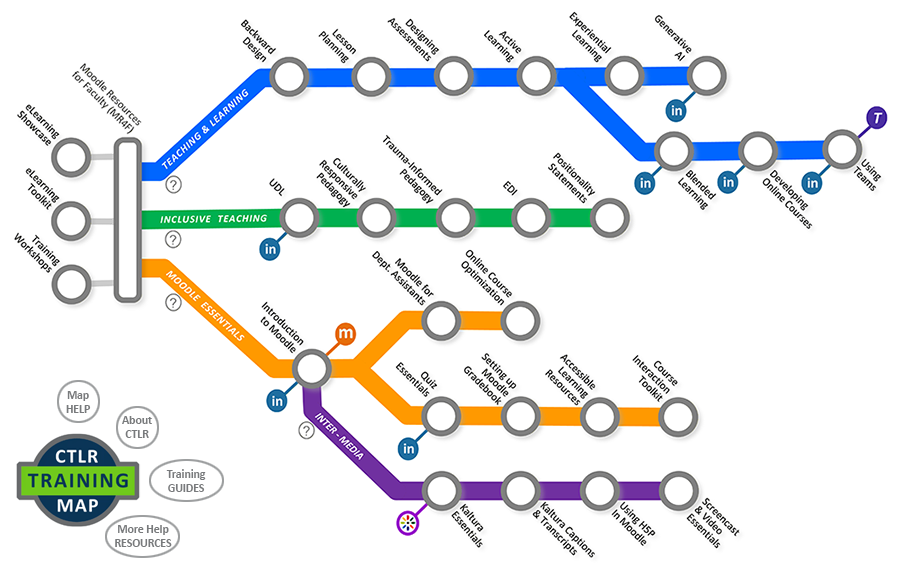
Curated by CTLR’s Instructional Associates, this path focuses on developing best practices in online teaching and learning. It includes theoretical and practical information that can encourage instructors towards VCC’s PIDP program.
Suggested Audience: VCC Faculty
Curated by CTLR’s Instructional Associates, this path focuses on the planning and design of inclusive learning environments to help you develop culturally-aware, safe, and empathetic learning experiences for your users.
Suggested Audience: VCC Faculty and Leaders
Curated by the eLSupport team, this path helps develop course authoring proficiency in the Moodle Learning Management System. It offers introductory training in most aspects of VCC’s Moodle LMS, and can lead to more specialized training in Gradebook management, quiz building, or interactive media design.
Suggested Audience: VCC Faculty and Staff
Curated by the eLSupport team, this path helps you develop interactive, rich media content for online courses.
Start learning VCC’s Kaltura media platform and then move on to creating interactive components using H5P, or dive into more advanced media topics like screencasting and video production.
Suggested Audience: VCC Instructors with previous Moodle experience
The Centre for Teaching, Learning, and Research (CTLR) promotes quality, innovation, and technology in teaching and learning at VCC.
The eLearning Support team (“eLSupport”) provides VCC faculty and staff with just-in-time support and training for learning technology, like VCC’s Moodle LMS.
Need Moodle Answers or Help?
Go to eLSupport Online in VCC TeamDynamix
The Instructional Associates (“IAs”) provide VCC Faculty with pedagogical and administrative leadership and support. Contact them at IASupport@vcc.ca
Find answers in eLSupport’s large KnowledgeBase library in TeamDynamix. (May require VCC login.)
Search Moodle’s vast repository of documentation or join in discussions with Moodlers from all over the world.
Select from a vast collection of free training courses from LinkedIn Learning. (May require VCC login.)
Brought to you by eLearning Support team in the Centre for Teaching, Learning, and Research (CTLR)
Can’t find the training you want? Have a question about eLearning or learning technology at VCC?
Send a help request to eLSupport.