Using Teams for synchronous virtual meetings
- We recommend using the Teams desktop app to host classes for full functionality over the web version.
- Download this VCC Microsoft Teams Quick Guide for full details on features with VCC license/settings
Watch our most recent workshop recording of teaching on Teams to be introduced to many Teams features at VCC (requires VCC login).
Getting Started
These links will help you get started using Teams for online course delivery:
- Microsoft Teams Essential Training (LinkedIn course, VCC login required)
- Successful Teams Meetings, Webinars and Events (LinkedIn course, VCC login required)
- Microsoft Teams meetings support (Microsoft)
- Do a test call to ensure audio/video is working before a meeting. (Microsoft)
- Share your Teams meeting link in Moodle (video, VCC Mediaspace)
- How to fix unverified user status (Gettysburg College)
Classroom Agreement and Recording Guidelines
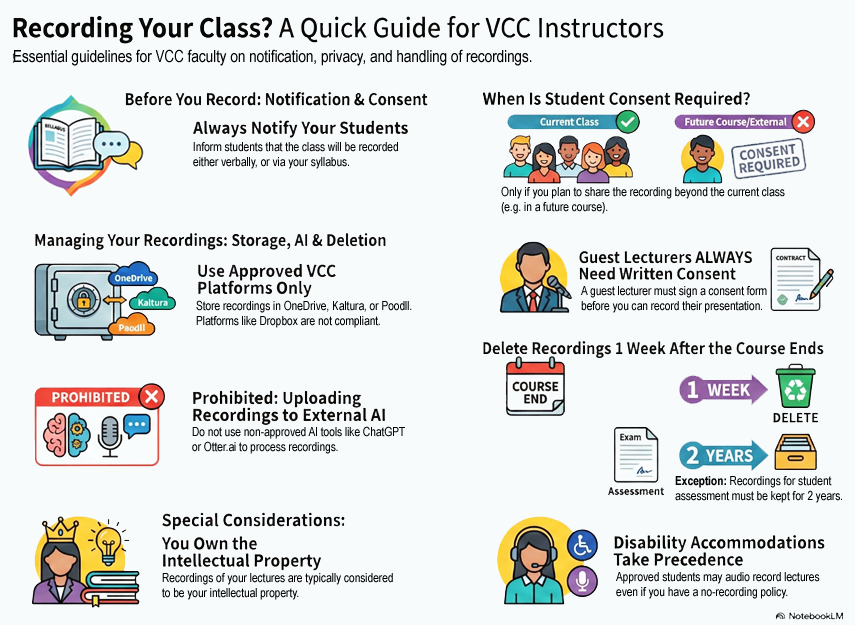
The following document and infographic describe VCC’s guidelines and policies around classroom recordings for instructors and students:
- Read our full Classroom Recording Guidelines (PDF)
Review all aspects of VCC’s recording guidelines and policies.